WordPress plugin

Honest Analytics

Cookieless website analytics in your WordPress dashboard. No third-party service, no IP addresses stored, no per-visitor rows.

Overview

Honest Analytics counts your visitors inside WordPress and shows the reports in the dashboard you already use. It is cookieless by default, keeps no IP addresses and no per-visitor rows, and sends nothing to another company: the data stays in your WordPress database.

The free Lite edition covers the everyday reports: pageviews and daily unique visitors, sessions and bounce rate, real-time visitors, content, sources and devices, with any report exported to CSV. Pro adds campaigns, locations and attribution, events, goals and funnels, WooCommerce orders and form submissions, crawlers including AI bots, and scheduled email reports. Importing your history from Google Analytics 4, WP Statistics or Independent Analytics is in the free edition.
  • No cookies by default

    Visitors are counted with a hash whose salt is overwritten every 24 hours. No IP address is stored.

  • Stays in WordPress

    Counts live in your own database. No third-party service, no telemetry and no licence check in Lite.

  • No limits in Lite

    No row caps, retention caps or date-range caps, and no nag screens.

Features

What it does

  1. Cookieless by default

    Visitors are counted with a 16-character hash of a daily salt, the address, the user agent and the site. The salt is overwritten every 24 hours.

  2. Nothing identifying stored

    No IP addresses, full referrer URLs or full user-agent strings are stored. Hits wait briefly in a write spool, then are folded into counters.

  3. Counts behind page caches

    The server counts what it sees and a small first-party script confirms the rest. Tested with WP Rocket, W3 Total Cache, LiteSpeed, NitroPack, Cloudflare and others.

  4. Respects opt-out signals

    A request carrying Sec-GPC: 1 is not counted, not queued and sent no tracker at all. Do Not Track can be honoured too.

  5. The everyday reports, free

    Dashboard, Real-time, Pages and page detail, Sources, Devices, and Content by post type, taxonomy and author, with CSV and JSON export from every report.

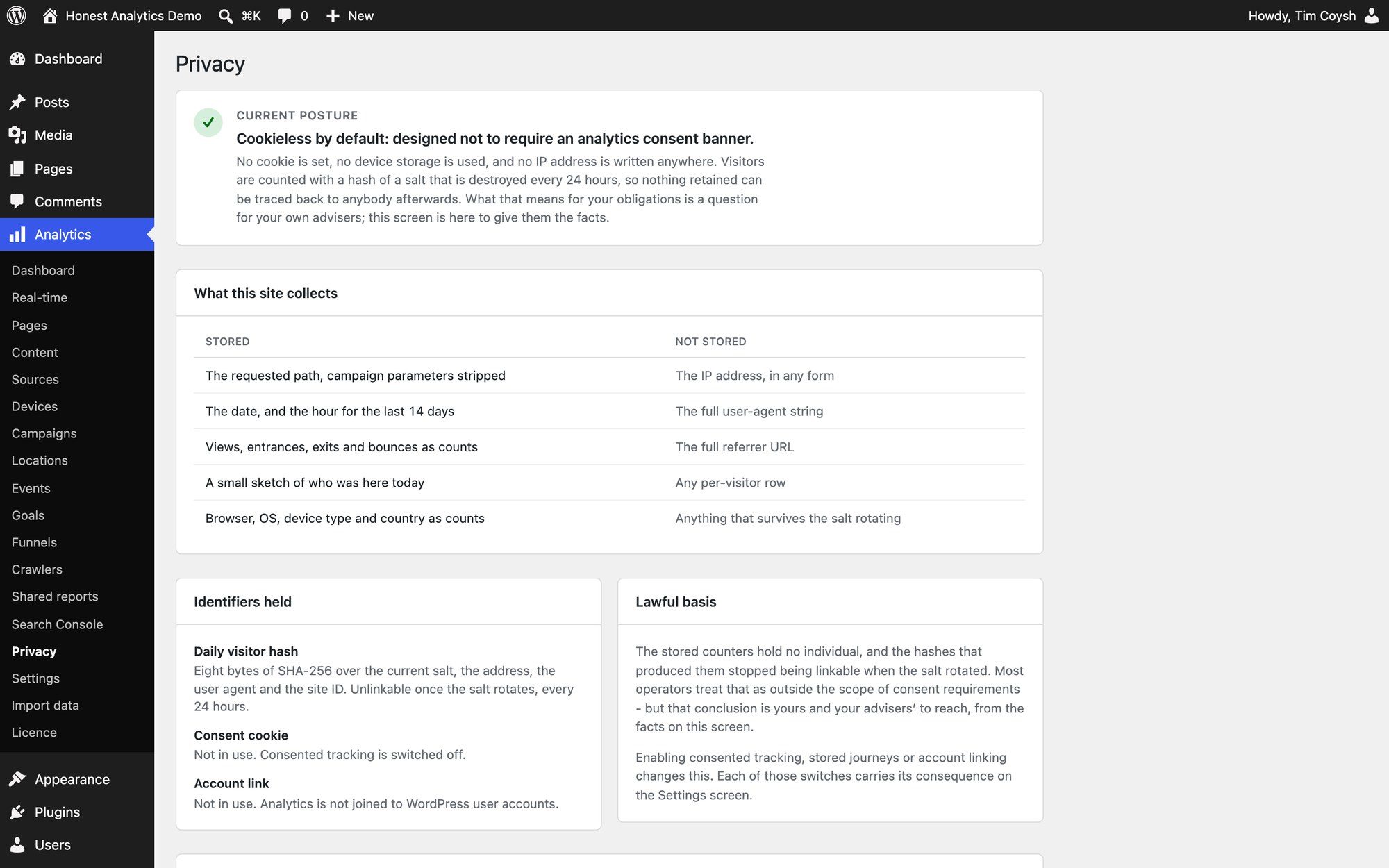
  6. A Privacy screen

    It states what this site stores and what it does not, in plain words, so whoever advises you has facts to work from.

  7. Bring your history

    Import from Google Analytics 4, WP Statistics or Independent Analytics in the free edition. Importing the same dates again replaces them rather than doubling up.

  8. Where you already work

    Two dashboard widgets, a Views column on your post lists and an analytics panel in the editor sidebar.

  9. Storage that stays small

    Storage grows with dimensions and time, not pageviews. Hourly detail is kept for a week, then compacted to daily; everything goes after 36 months at most.

  10. No cron or terminal needed

    Ordinary page views drive the aggregation on hosts without scheduled tasks. WP-CLI commands, multisite support and a signed, read-only reporting API are there if you want them.

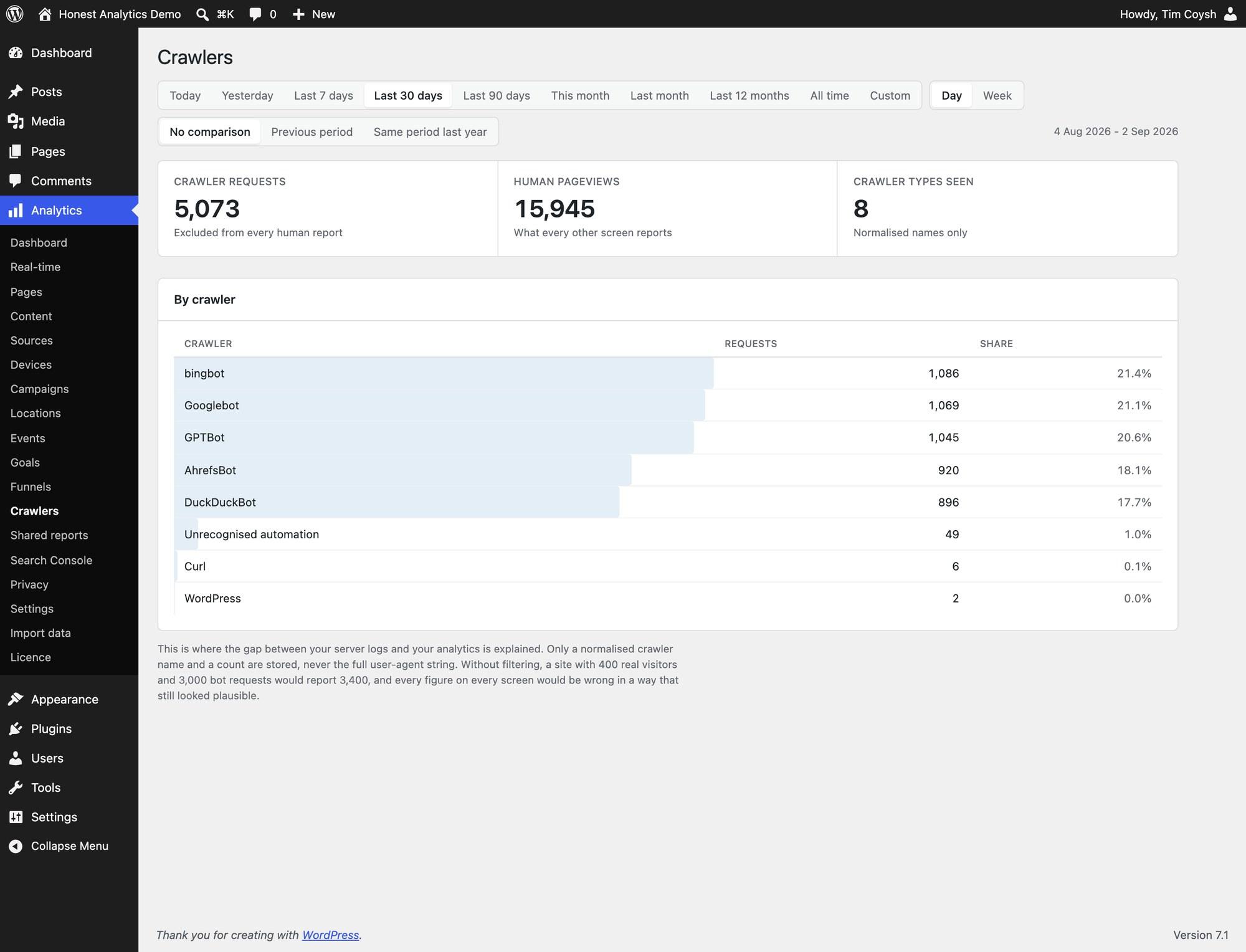
  11. Pro: outcomes and crawlers

    Campaigns with a choice of attribution, countries from a local geo database, events, goals, funnels, and crawler reporting including AI bots.

  12. Pro: reports for clients

    Client-shareable report links as a page or PDF, scheduled email summaries, Search Console queries, and WooCommerce, Contact Form 7, Gravity Forms, WPForms and Ninja Forms integrations.

Screenshots

See it in WordPress

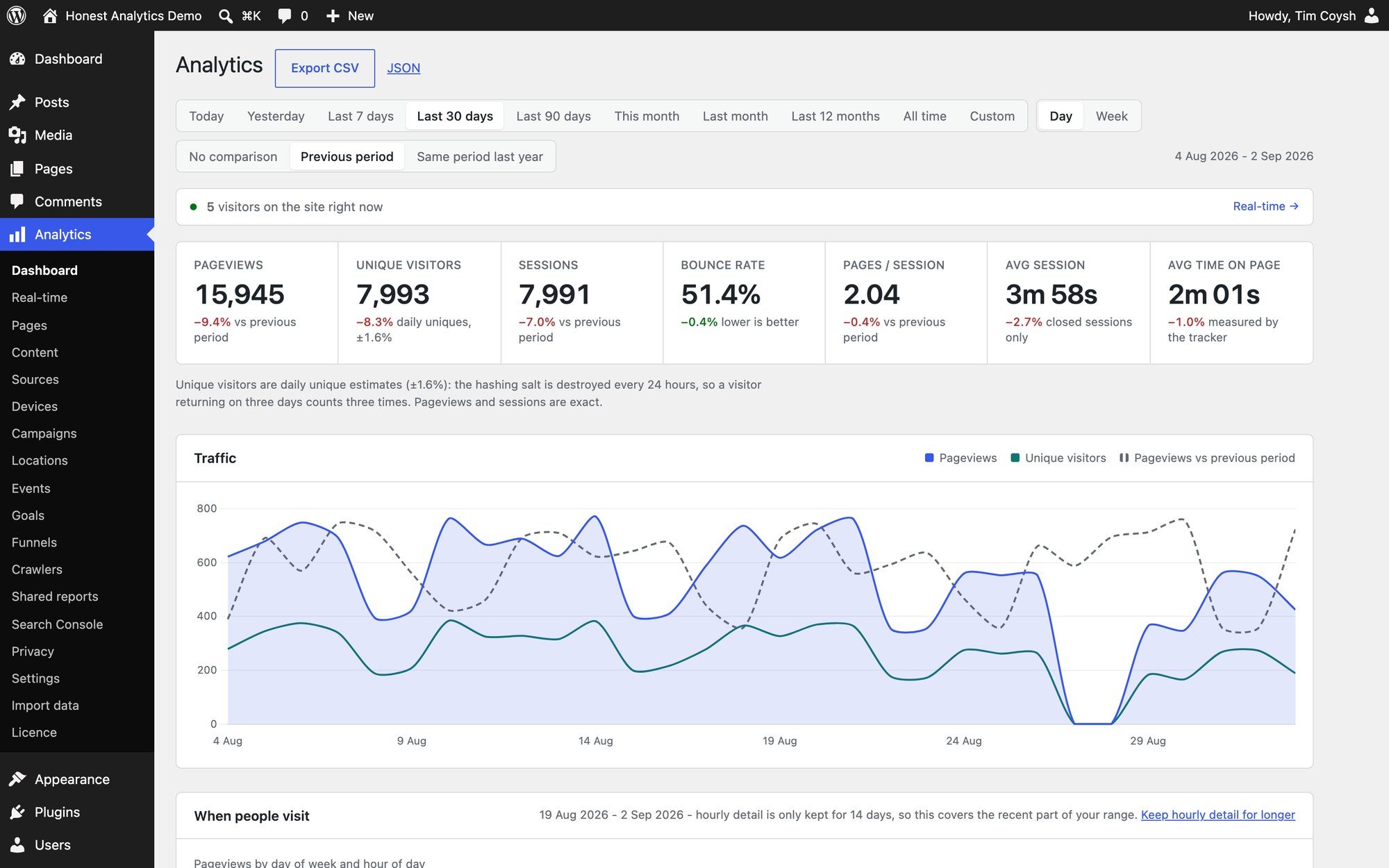
  • Honest Analytics dashboard in WordPress with pageviews, daily unique visitors, a traffic chart, a weekly heatmap and top pages.
    (view larger)
    The dashboard, inside the WordPress admin (Pro edition shown).
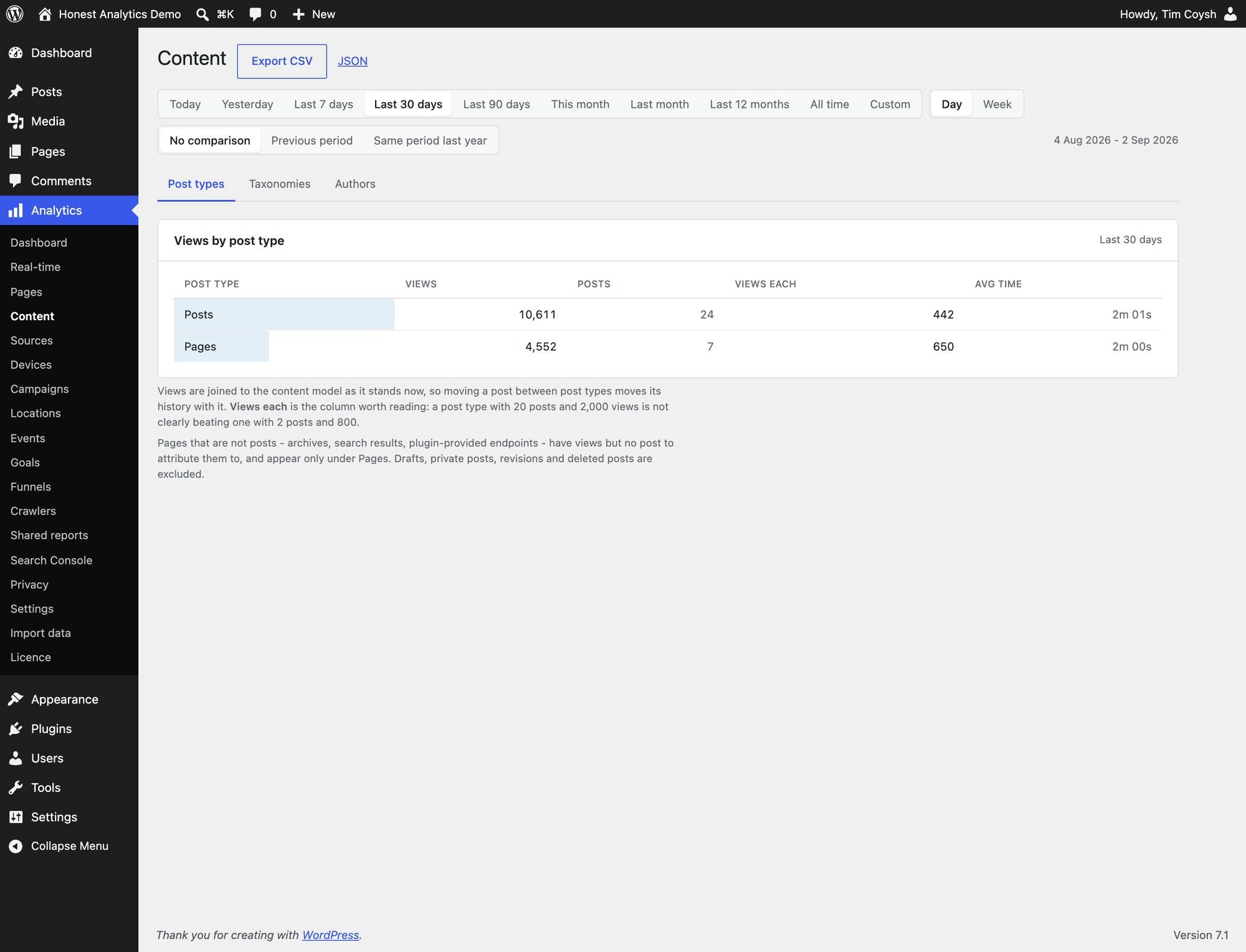
  • Content report in the WordPress admin listing views, posts, views per post and average time by post type.
    (view larger)
    Content performance by post type, with taxonomy and author tabs.
  • Honest Analytics Privacy screen listing what the site stores and never stores, with identifiers held and lawful basis.
    (view larger)
    The Privacy screen: what is stored, and what never is.
  • Crawlers report showing crawler requests, human pageviews and a ranked list of bots such as Googlebot and GPTBot.
    (view larger)
    Crawler traffic on its own screen, kept out of every figure (Pro).

Pricing

Pick an edition

  • Lite

    Free

    Any number of sites, no licence key

    • Pageviews and daily unique visitors
    • Sessions and bounce rate
    • Real-time visitors
    • Content performance
    • Sources and devices
    • Import from GA4, WP Statistics and Independent Analytics
    • CSV and JSON export
    • Any number of sites, no licence key
    Get it free (opens in a new tab)
  • Agency

    £119

    One-off, plus VAT. Then £49 a year for updates and support, if you want them

    • Everything in Pro
    • Unlimited site activations
    • One key across client sites
    • Email support for 12 months
    Get Agency (opens in a new tab)

Get started

Install Honest Analytics

  1. Download the plugin from honest-analytics.com (opens in a new tab).
  2. In WordPress, go to Plugins → Add New Plugin → Upload Plugin, choose the file, then Activate.
  3. The documentation (opens in a new tab) covers the settings and everything after that.

Questions

Questions people ask

Does it use cookies?
Not in the default configuration. Anonymous counting works without an analytics cookie, and the free edition has no feature that sets one. Some optional Pro features do, and they say so before you enable them.
Do I need a cookie banner?
The default anonymous mode is designed so that Honest Analytics itself doesn't need an analytics consent banner. Whether your site needs one overall depends on everything else it runs and where your visitors are, so that is a question for your own adviser. The Privacy screen sets out the facts.
Where is the data stored?
In your own WordPress database, on your own hosting. Nothing is sent to us or to a third-party analytics service, and there is no telemetry.
Will it slow my site down?
Counting happens after the page has been sent to the browser, so visitors aren't waiting on it. The front end loads one small first-party script, and pages served straight from a cache are still counted.
Why don't unique visitors add up across days?
The identity is destroyed every 24 hours, so unique visitors are daily estimates. Someone who visits on Monday and Thursday counts once on each day. Adding days together would double-count, so the plugin merges the underlying sketches instead.
Can I bring my Google Analytics history?
Yes, in the free edition. Honest Analytics imports from Google Analytics 4, WP Statistics and Independent Analytics. GA4 needs a free Google Cloud client, which takes about five minutes to set up. Expect pageviews to line up closely and visitor counts not to.
What happens to Pro if I don't renew?
It keeps working, with every feature, for as long as you want to run it. The licence has no expiry. What lapses is new versions and email support, and renewing picks both up again. Security fixes reach everyone either way.
What happens to my data if I delete the plugin?
Deactivating keeps everything, and by default deleting keeps your analytics tables too, because the rollups can't be rebuilt from anything else. To remove them, turn off Keep data on uninstall in Settings before you delete the plugin.

Support

Help when you need it

More plugins

From Coysh Digital

All plugins
  • Download Tracker

    Craft CMS $10

    Lightweight, static-cache-friendly download tracking for Craft CMS.

  • Craft Analytics

    Craft CMS Lite free, Pro $69

    Privacy-first, consent-aware analytics that runs inside Craft CMS.

  • Formie Beacon CRM

    Craft CMS Free

    A completely free Beacon CRM integration for Formie.

Get in touch

Use the form below to tell us about your project, or email [email protected] directly. We’ll get back to you as soon as we can to see how we can help.