Craft CMS plugin

Short.io for Craft

Short links and QR codes for Craft CMS entries, powered by Short.io - created, renamed and retired automatically as you publish.

Overview

Short.io for Craft gives every entry a short link and keeps it correct without anyone having to think about it. Publish an entry and it gets a link, change the slug and the link repoints itself, unpublish and it stops working. Editors get the short URL, a QR code and click counts in the entry sidebar, without leaving Craft.

It is deliberately small: no new element type and no new field type, just a sidebar panel, a Links screen and a handful of Twig functions. Set UTM defaults once and override them per entry, adopt the links already on your domain with a single command, and check the connection with a built-in doctor before an editor finds the problem for you.
  • Links follow entries

    Created on publish, repointed when the slug changes, expired on unpublish and restored when the entry goes live again.

  • No new field types

    Just a sidebar panel, a Links screen and a few Twig functions. No new element type either.

  • Free, Craft 4 and 5

    Free on the Craft Plugin Store, with Craft 4 and Craft 5 supported from one release.

Features

What it does

  1. Links that follow entries

    A short link is created when an entry goes live, repointed when its slug changes, expired when it comes down and restored when it goes back up.

  2. Entry sidebar panel

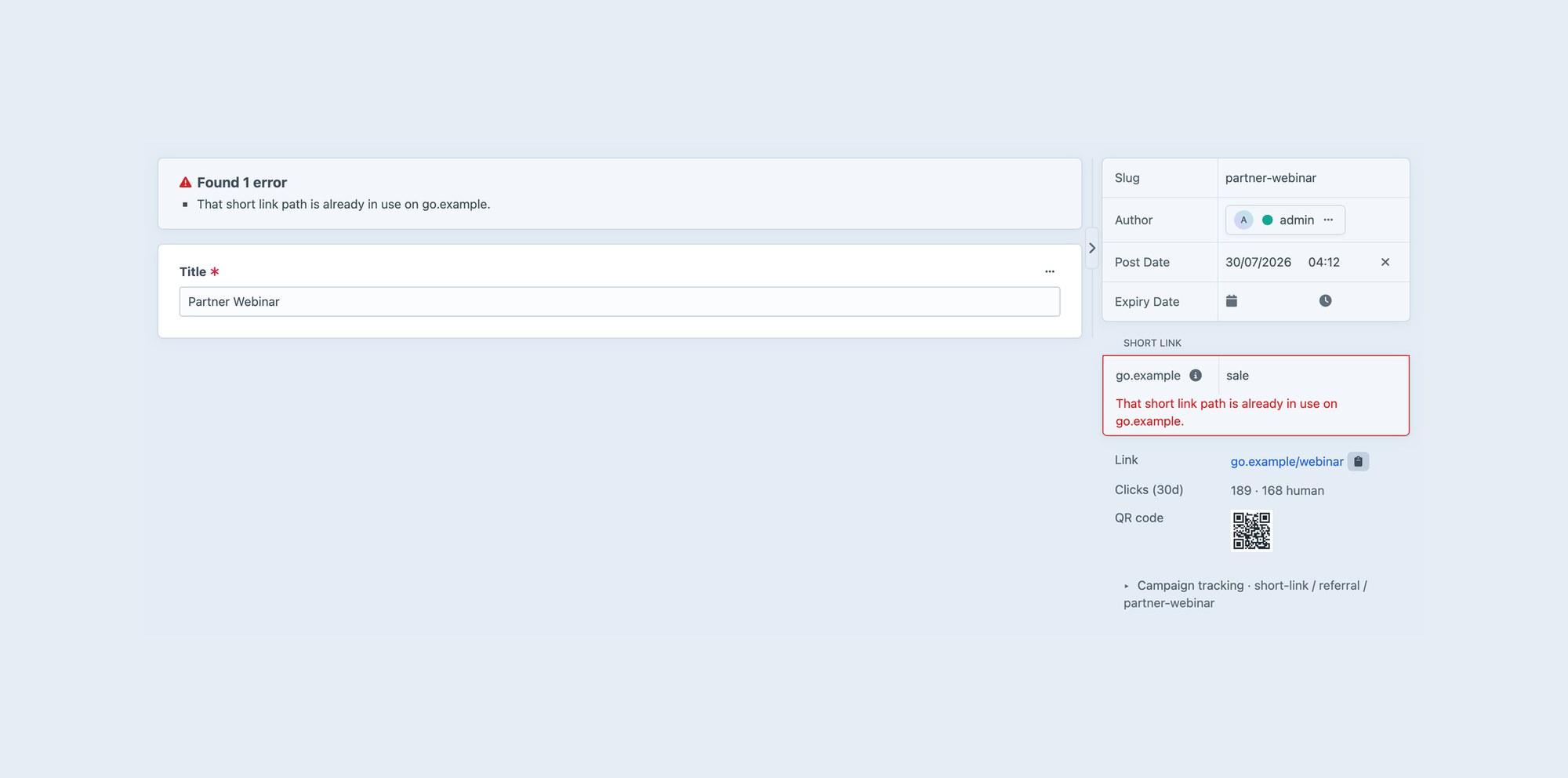
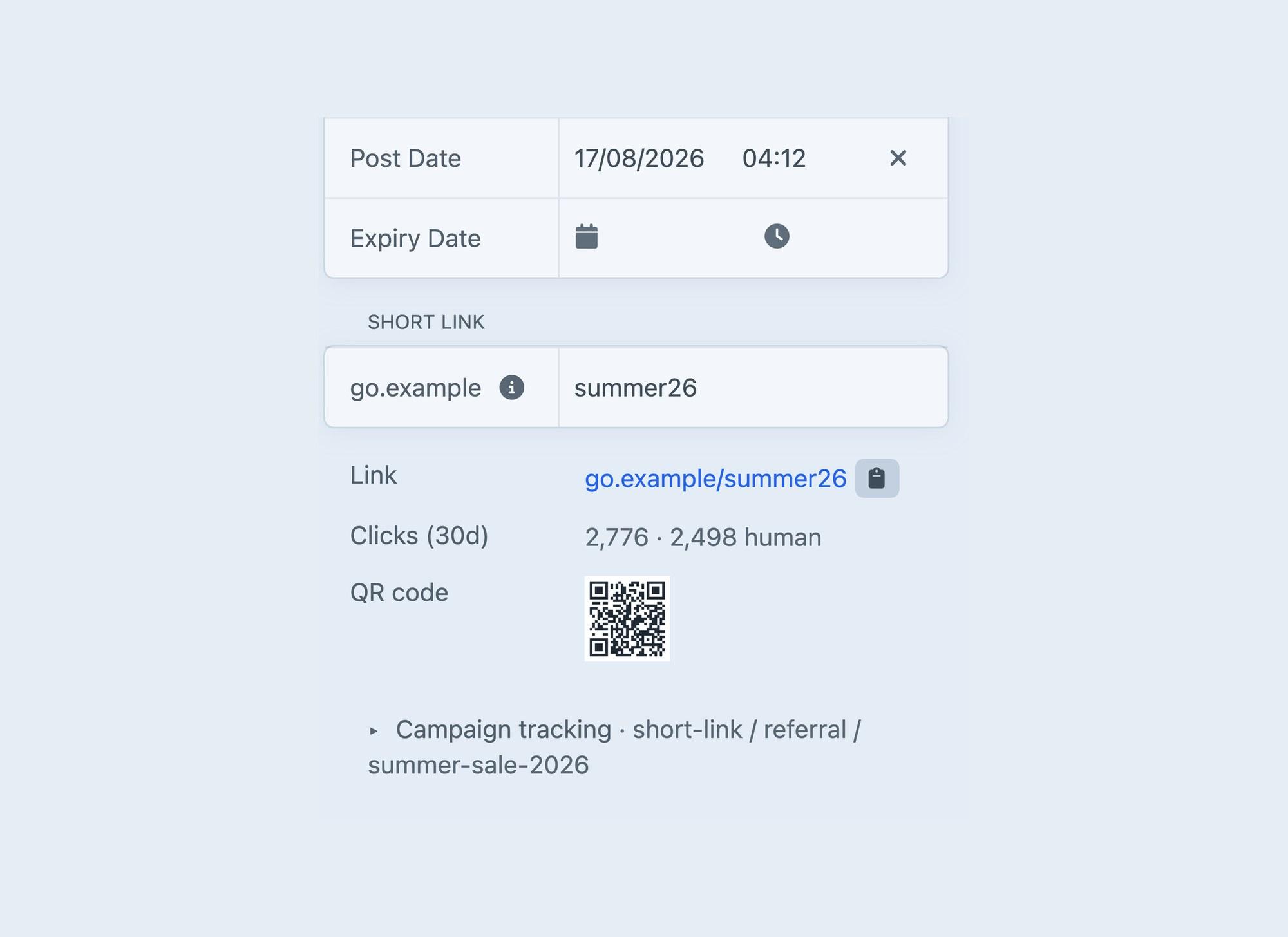
    The short URL with a copy button, an editable path, the click count and a QR code, right where editors already work.

  3. Custom paths, safely

    Type a path to claim it. If it is taken, the save stops with a readable message. If the existing link is already yours, it is adopted, not duplicated.

  4. QR codes anywhere

    Short.io serves QR images from a public URL, so one line of Twig puts a QR code on any page or in any email.

  5. Campaign tracking

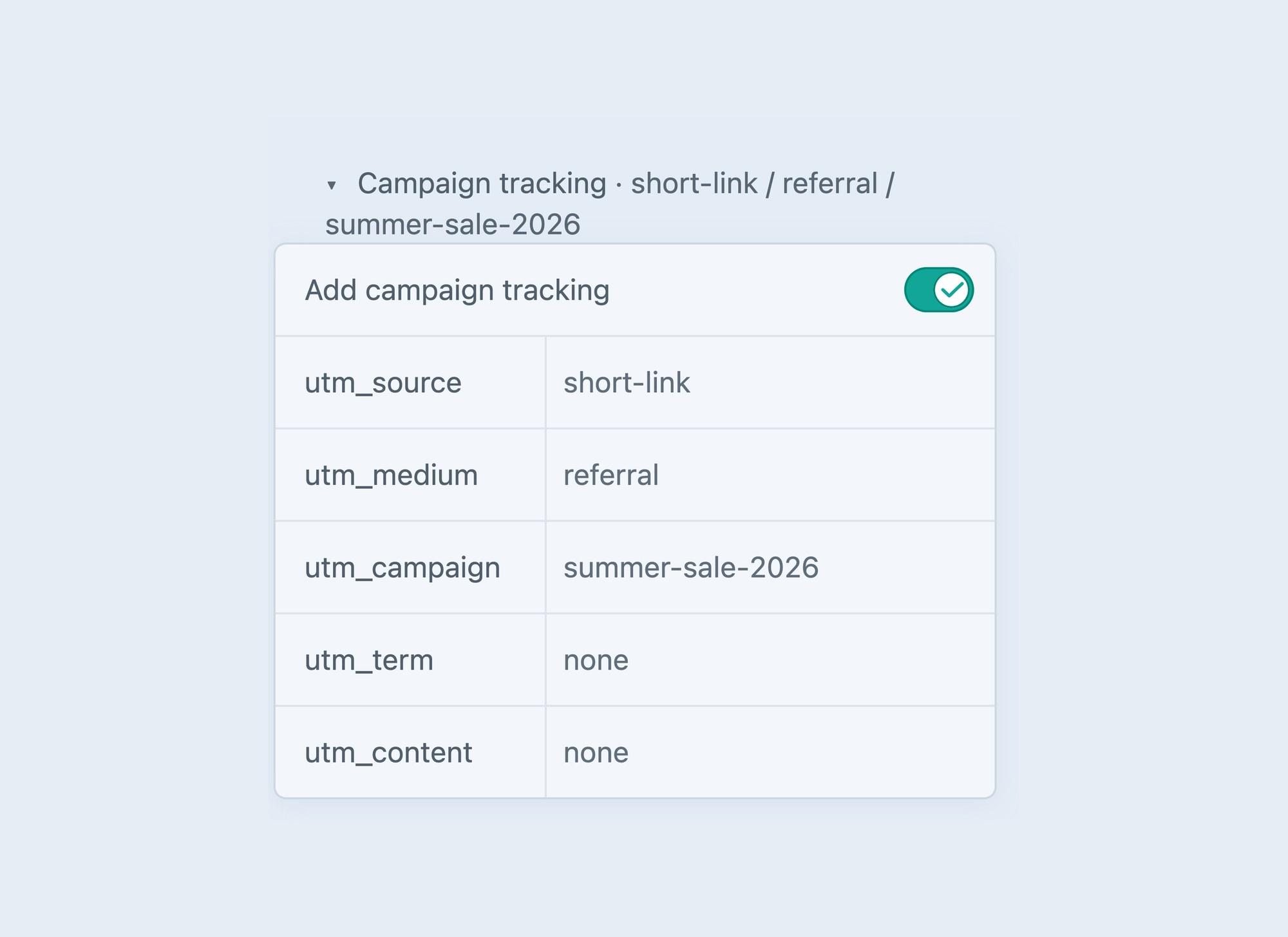
    Set default UTM parameters once, override them on any entry, or switch them off for one link. Defaults can be templates, so utm_campaign can be the entry slug.

  6. Human clicks, told apart

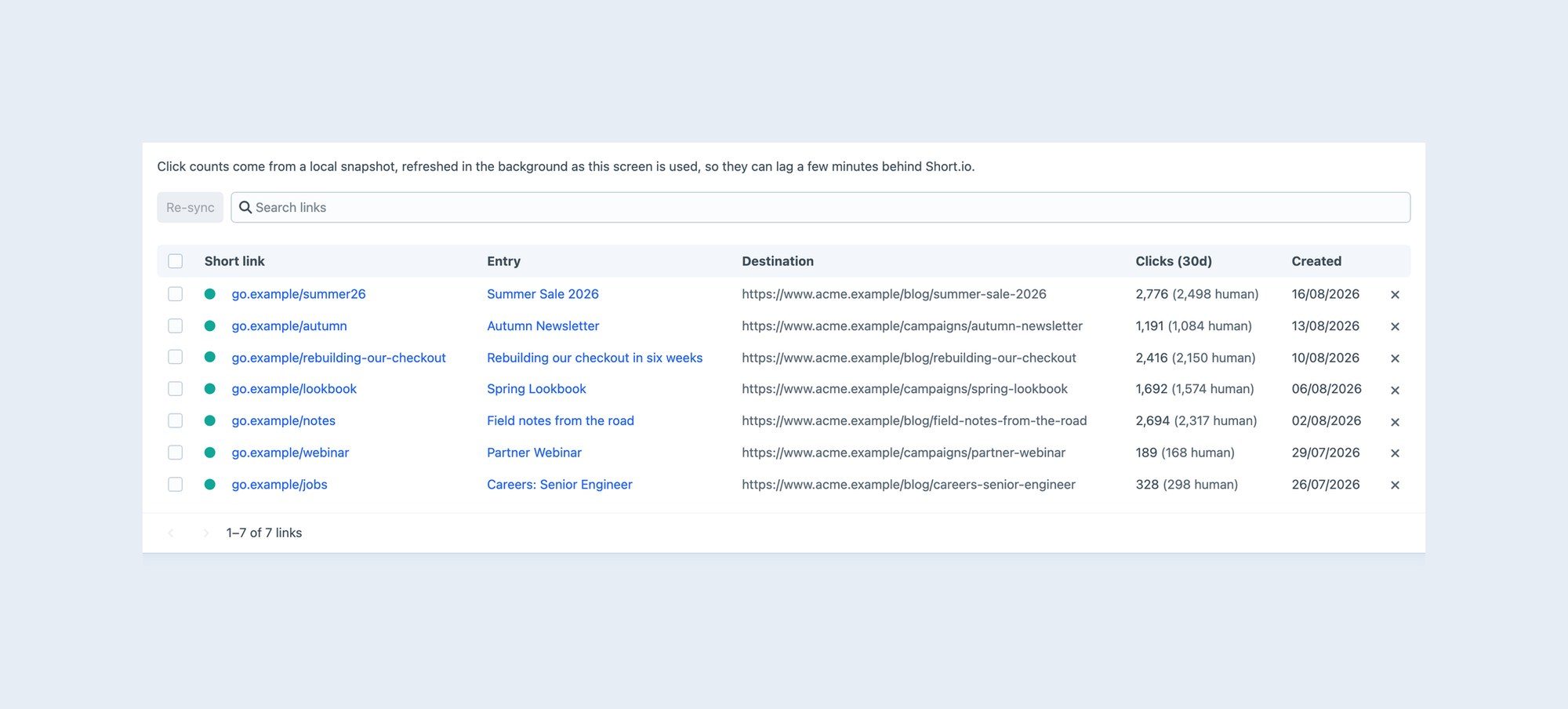
    Short.io separates bot traffic from real visitors, and the sidebar and Links screen show both figures for the last 30 days.

  7. The Links screen

    Every managed link with its entry, destination, clicks and date, in one of Craft's own admin tables, with search, sorting, re-sync and delete.

  8. Safe on a shared domain

    The plugin only modifies links it created. An existing path stops the save rather than being taken over, and automatic paths fall back to -2, -3 and so on.

  9. Adopt existing links

    One command matches the links already on your domain to the entries they point at. It records the mapping locally and never writes to Short.io.

  10. A doctor built in

    php craft short-io/links/diagnose creates a throwaway link, expands it, fetches its QR code and statistics, then deletes it, so a wrong API key is caught early.

  11. Publishing never waits on Short.io

    If Short.io is unreachable, the entry still saves and a queue job creates the link afterwards. A rejected key or a taken path still stops the save.

  12. Permissions enforced server-side

    View and manage permissions sit alongside Craft's own. A hand-crafted request cannot rename or delete a link, and settings stay admin-only because they hold the API key.

Screenshots

See it in the control panel

Get started

Install Short.io for Craft

  1. Require it with Composer:
    composer require coysh-digital/craft-short-io
  2. In the control panel, go to Settings → Plugins and install it.
  3. The documentation (opens in a new tab) covers the settings and everything after that.

Questions

Questions people ask

What do I need?
A Short.io account with at least one connected domain, and a secret API key from Integrations and API in your Short.io dashboard. Put the key in .env and enter $SHORT_IO_API_KEY in the plugin settings, so the secret stays out of project config.
What happens to a link when I unpublish an entry?
By default it expires, which actually stops it working. Archiving a link on Short.io only hides it from the dashboard, and the link keeps redirecting. Link expiry is a paid Short.io feature, so on plans without it the plugin repoints the link at a fallback page instead. Publish again and the same short URL comes back.
We already use Short.io. Can we keep our links?
Yes. Run php craft short-io/adopt --dry-run to see what would happen, then run it without --dry-run to match existing links to the entries they point at. It only records the mapping in Craft and never writes to Short.io. Ambiguous matches are reported, not guessed.
Will it touch links we made by hand?
Not by default. With Protect existing links on, the plugin only modifies links recorded against an entry in its own table. A path that already exists stops the save instead of being taken over.
What if Short.io is down when someone publishes?
The entry saves anyway and a queue job retries the link, so Craft's queue needs to be running. If you would rather editors found out straight away, set If Short.io is unreachable to Block the save.
Why are human clicks lower than total clicks?
Link previews in chat apps, crawlers and monitoring all count as clicks, and Short.io leaves them out of the human figure. Figures cover the last 30 days by default, because Short.io's ‘total’ period reports zero.
Will resaving every entry flood the API?
No. Console commands don't sync links unless you turn on Sync on console commands, so php craft resave/entries won't become thousands of API calls. The plugin also throttles itself against Short.io's published rate limits.
Why didn't an entry get a link?
The plugin only acts on live entries in sections that have URLs and are enabled in its settings, and only when Create links automatically is on or an editor typed a path. Drafts, revisions and entries nested in Matrix fields are skipped.

Support

Help when you need it

More plugins

From Coysh Digital

All plugins
  • Download Tracker

    Craft CMS $10

    Lightweight, static-cache-friendly download tracking for Craft CMS.

  • Craft Analytics

    Craft CMS Lite free, Pro $69

    Privacy-first, consent-aware analytics that runs inside Craft CMS.

  • Formie Beacon CRM

    Craft CMS Free

    A completely free Beacon CRM integration for Formie.

Get in touch

Use the form below to tell us about your project, or email [email protected] directly. We’ll get back to you as soon as we can to see how we can help.